
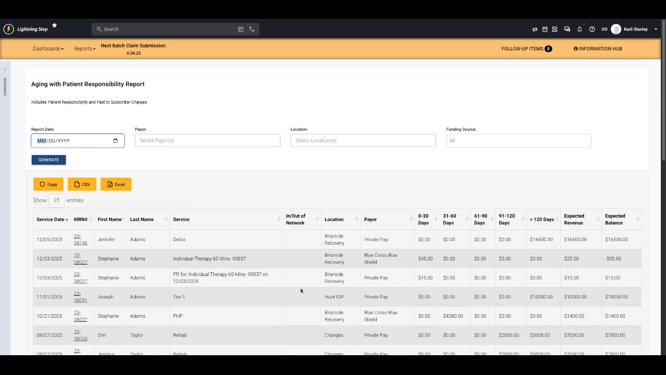
Aging with Patient Responsibility Report
This report delivers a comprehensive view of AR balances, encompassing both insurance and patient charges. It displays patient responsibility amounts, adjustments, and paid-to-subscriber records. Information is organized by client, program, and payer, highlighting the earliest date of service in each group as the service date. These groupings enable users to easily compare expected revenue against what remains outstanding, while keeping track of how long each balance has aged.
Advanced Aging Report
Designed to focus on insurance and true private pay balances, the Advanced Aging Report excludes patient responsibility and paid-to-subscriber amounts. While it does not offer direct expected revenue comparisons, it retains familiar groupings by program and payer. This view is suited for understanding totals and aging trends specifically for insurance and private pay sources, aiding in financial oversight and targeted collections follow-up.

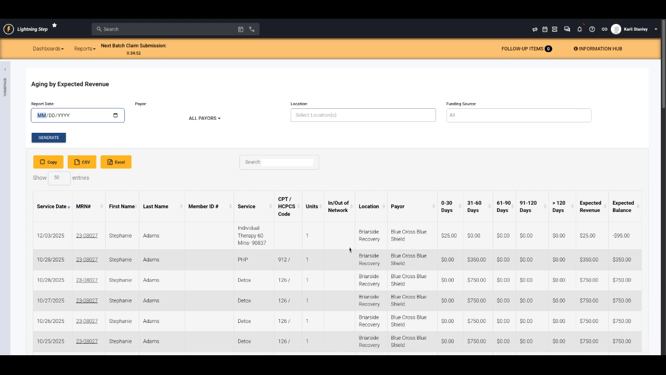
Aging by Expected Revenue Report
The Aging by Expected Revenue Report shifts the lens to service and billing details, presenting CPT or HCPCS codes and unit counts along with aging timelines. Patient responsibility and paid-to-subscriber information are not included here. Instead, the focus is on expected revenue amounts and their outstanding duration, making this report valuable for analyzing reimbursement trends and aging of primary claims.
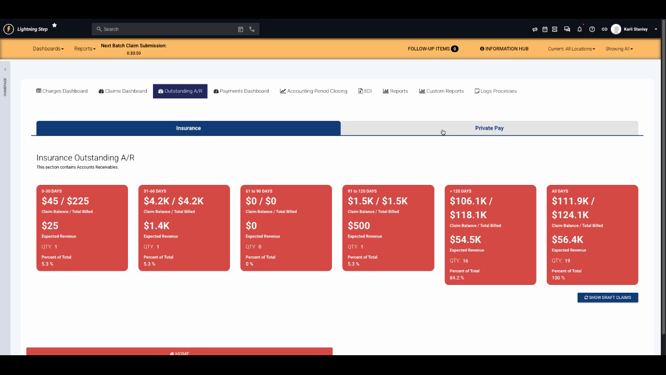
Outstanding AR Dashboard View
The Outstanding AR dashboard tab organizes receivables into categories such as insurance and private pay, with private pay encompassing both patient responsibility and paid-to-subscriber balances. Charges are automatically bucketed into industry-standard aging groups, enabling at-a-glance recognition of where the largest or oldest balances reside. Interactive elements facilitate deeper analysis within specific aging buckets, allowing for detailed review of claims and charges.
Records within the dashboard are segmented to show amounts attributed to insurance and private pay, subdivided by standard aging intervals. This format assists financial teams in quickly identifying trends and prioritizing outreach for collection activities.
Drilling into an aging bucket reveals supporting claims and charges, promoting efficient follow-up efforts by providing direct access to relevant account details. The ability to annotate or take action—such as assigning notes or initiating write-offs—streamlines workflow within the dashboard.

Interactive navigation within the dashboard connects users to specific accounts or claims, supporting real-time research and reducing the steps required to address outstanding balances.
Summary
The range of reporting and dashboard options in Lightning Step caters to varying needs—from high-level executive summaries to operational reports tailored for collections staff. By leveraging these tools, organizations gain flexibility, better visibility into their AR, and the capacity to drive timely collections efforts. Internal documentation and support resources are available for deeper exploration of each report’s features and how they fit into particular financial workflows.
