
Unallocated Client Payments
Step 1: From the home page, click Financial.
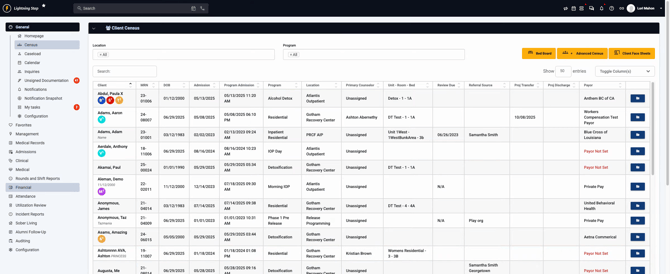
Step 2: Select Financial Dashboard from the menu.
Step 3: In the dashboard, navigate to Payments Dashboard at the top.
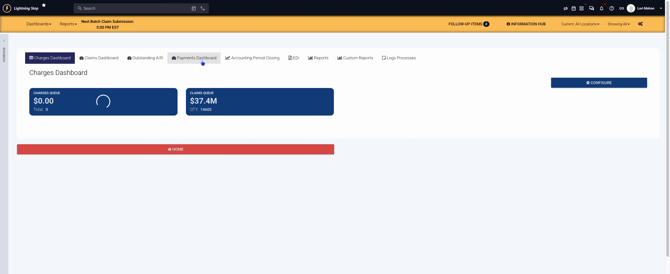
Now you'll see three main payment buckets: Unallocated Client Payments, Unallocated Insurance Payments, and Credit Balance.
Step 4: Review Unallocated Client Payments. These show payments received (like copays) before claims are created or services are performed. Payments remain here until matched with a claim.
Step 5: Assign payments by choosing the relevant Date of Service. Select individual or multiple service dates as needed.
Step 6: Click Auto Allocate if you want the system to automatically distribute payments to charges.
Step 7: Make sure the Charge Option field is set correctly before saving.
Step 8: Click Save.
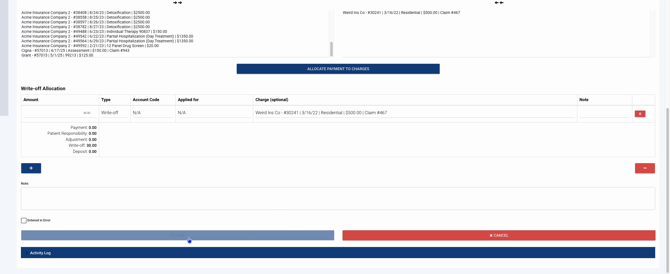
Step 9: To auto allocate payments for all available charges, use the Auto Allocate Payments feature. This opens everything for quick allocation.
Unallocated Insurance Payments
Step 1: Locate Unallocated Insurance Payments. This section displays insurance payments such as ERAs (Electronic Remittance Advices) or uploaded remittance files.
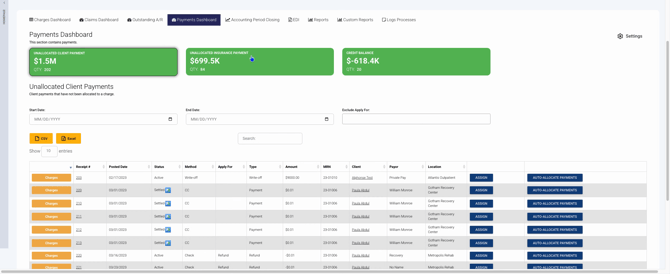
Step 2: Allocate these payments manually or, if the payment is marked "Assigned," use Auto Allocate. Manual payments and ERAs with assignment are distinguished in this view.
Step 3: Follow the same allocation process as with client payments.
Credit Balance
Step 1: Check the Credit Balance bucket. This shows any credits currently due.
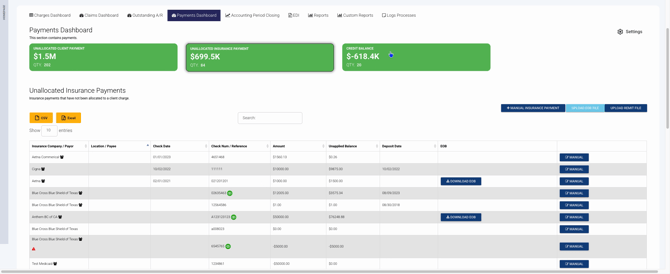
Step 2: Track and manage outstanding credits directly from this section.

The Payments Dashboard streamlines payment allocation and credit management. Regularly reviewing these buckets keeps your accounts organized and ensures payments are properly matched and credited. Use this dashboard as your central hub for all payment-related activities.
