
Before You Start
Make sure you've got these boxes checked:
-
Customer has purchased Lightning Step Financial/RCM product
-
You've completed the kick-off call with them
-
You've gathered all the customer info you need for configuration
The Step-by-Step Process
Step 1: Double-Check the Purchase
Pretty straightforward – make sure the customer actually bought the Lightning Step Financial/RCM product and they're ready to move forward with the TriZetto setup. We currently offer Claims and ERA as a round trip price included in the "LS Clearinghouse" line item but every other transaction is an additional cost and should clearly be outlined in the customers contract (i.e. Eligibility is .10 per transaction on top of the Clearinghouse Claims/ERA Package)
Step 2: Wrap Up That Kick-Off Call
You should have already done this, but make sure you've completed the kick-off call and collected all the customer information you'll need for the TriZetto form.
Step 3: Fill Out the Lightning Step Order Form
Here's where things get interesting. You'll need to:
-
Download the order form from here: https://drive.google.com/file/d/1hL4HSDiKmr8Q3fi9bBI9am5yFcNsAF67/view?usp=drive_link
-
Fill it out with all the customer info you gathered (this should be filled out by LS, this is not to be sent to the customer)
Pro Tips for Filling Out the Form:
-
Keep It Simple: One Lightning Step Server should equal one TriZetto site ID/form
-
The Standard Rule: Add all customers to our parent account 61CA – this is our go-to approach
-
The ONLY Exception: If you've got a customer who's going to have a bunch of different customers and servers under them, DON'T add them to 61CA. Instead, you'll want to create their own parent site where we can make a custom order form. Think of it like the Ava Billing setup – they get their own little kingdom where we can add sites under their parent account.
-
Step 4: Send Off That Order Form
From your HubSpot implementation ticket, send an email to:
Use the "TriZetto Order Form" email template and be sure to attach your completed form.
Step 5: Wait for TriZetto to Setup a New Site
Now we play the waiting game. TriZetto will take about 2-5 business days to generate the site. Once they're done, they'll shoot you back an email with the site number. Keep an eye on your inbox!
Step 6: Customer Assigned to Implementation Representative
Once TriZetto has that site number, they kick off their implementation process. Within 24-48 hours, your customer is going to get two important emails from their new TriZetto Implementation Representative:
Email #1:
-
Introduces the TriZetto rep
-
Provides login info for EEP (that's the EDI Enrollment Portal)
-
Gives them access to the TriZetto Provider Solutions website
Email #2:
-
Schedules the kick-off call
-
Includes a prep list of everything the customer needs to have ready
Step 7: Help Your Customer Get Ready
Make sure your customer has all this stuff ready for their TriZetto Kick Off Call. Trust me, having everything prepared makes this go so much smoother:
-
Group NPI(s)
-
Provider NPI(s)
-
Provider numbers or PTAN
-
Tax identification number(s)
-
Practice address
-
GO LIVE date
-
Accepted insurances that are fully credentialed ← Super important!
-
How they bill claims in box 33 (group or individual NPI) ← Also super important!
Step 8: TriZetto Takes Over for a While
The TriZetto rep will walk your customer through setting up their enrollments in EEP and teach them how to use the portal. This is where the customer starts their transition journey – they'll be working with TriZetto for the next 60 days.
Step 9: Establishing SFTP Connection
After the TriZetto call, their Implementation Specialist will send you a secure email with the SFTP username and password. Here's what you need to do with those credentials:
Setting Up the Lightning Step Server:
-
Open the customer's account
-
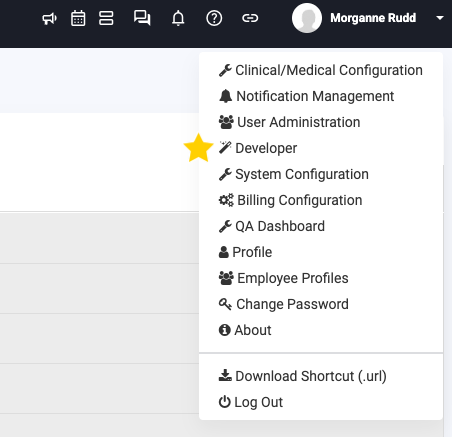
Go to Developer
-
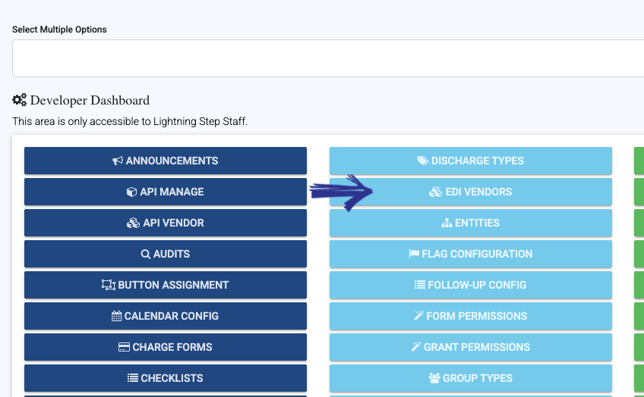
Click EDI vendor (it's in that second light blue column)
-
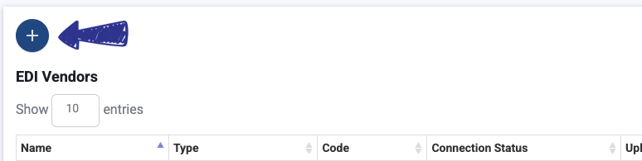
Hit the dark blue + button in the upper right corner
-
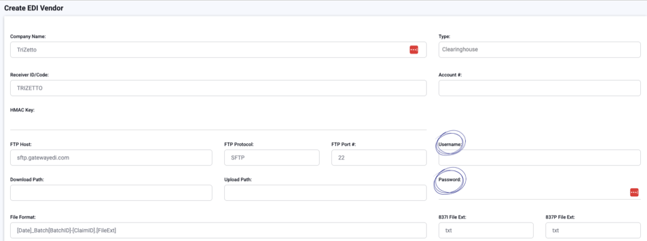
Click TriZetto at the top of the page under the "templates" header. This will populate the default fields required

-
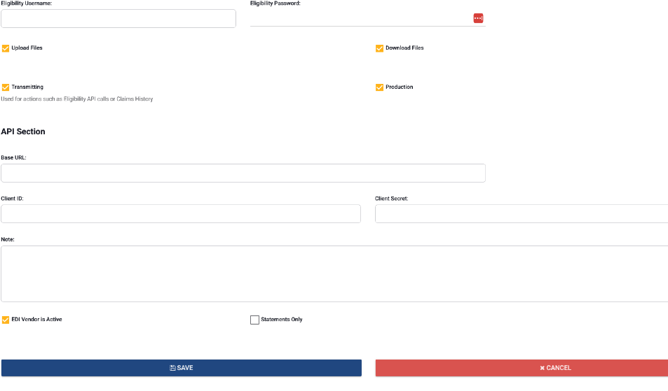
Scroll down and enter the username and password in their respective fields
-
Make sure you check ALL these boxes:
-
Upload ✅
-
Download ✅
-
Transmitting ✅
-
Production ✅
-
EDI Vendor is Active ✅
-
Add the Username and password provided by TriZetto
-
Username is the Site ID
-
Password is given per customer
-
-
Enter the Site ID in the Account ID field (this will activate Eligibility)
-
-
Click Save
And boom! You're done! The connection is live and your customer is all set up.
Pro tip: You must go and setup all locations with the EDI vendor to ensure that billing is setup properly.
Step 10: Updating Location Pay-to Information
Now that you have the SFTP all setup, it’s time to associate it to all locations.
-
Navigate to each location
-
Scroll down to pay-to information
-
Add TriZetto
Step 11: Sending Test Claims
-
Work with your customer to generate 3-5 real claims with real client information
-
Process these claims as normal
-
Work with your TriZetto Implementation Specialist to correct any errors and continue to rebill until TriZetto give you the green light and activates the customers site.
-
Note: The claims sent will need to be rebilled but no charge in incurred for these claims
-
Quick Timeline Reference
-
Order form submission to site generation: 2-5 business days
-
Site generation to customer emails: 24-48 hours
-
Total process: About 7-10 business days
When Things Don't Go According to Plan
Site number taking forever? If it's been more than 5 business days, reach out to the TriZetto contacts including Morganne Rudd.
Customer saying they never got those emails? Double-check their email address and have them peek in their spam folder.
SFTP credentials acting up? Contact the TriZetto Implementation Representative directly.
Need Help?
Got questions or running into issues? Reach out to morganne@lightningstep.com
Remember: Keep your HubSpot ticket updated with each milestone, and don't hesitate to keep the customer in the loop about where things stand. Communication is key to keeping everyone happy!
